
Showglo DMX Lighting Control Software
Docs
Showglo
Showglo Plugin
Main Site
Support
Login
Docs
Showglo
Showglo Plugin
Main Site
Support
Login
Products Showglo Plugin - User Manual Settings
Settings
  • Introduction
  • Getting Started
    • Installation
      • Overview
        • Show File
        • Settings
          • Playbacks
            • Universes
              • Fixture Library
                • Fixtures
                  • Fixture Patch
                    • Ports
                      • Haze
                      • Live View
                        • Playbacks Editor
                          • Preset Browser
                            • Bank Editor
                              • Playback Editor
                                • Preset Slots
                                • Preset Editor
                                  • Preset
                                    • Steps
                                      • Fixture Selector
                                        • Controls
                                          • Effects
                                          • Appendices
                                            • Glossary
                                              • Specifications
                                                • Requirements
                                                  • Troubleshooting
                                                  • Introduction
                                                  • Getting Started
                                                    • Installation
                                                      • Overview
                                                        • Show File
                                                        • Settings
                                                          • Playbacks
                                                            • Universes
                                                              • Fixture Library
                                                                • Fixtures
                                                                  • Fixture Patch
                                                                    • Ports
                                                                      • Haze
                                                                      • Live View
                                                                        • Playbacks Editor
                                                                          • Preset Browser
                                                                            • Bank Editor
                                                                              • Playback Editor
                                                                                • Preset Slots
                                                                                • Preset Editor
                                                                                  • Preset
                                                                                    • Steps
                                                                                      • Fixture Selector
                                                                                        • Controls
                                                                                          • Effects
                                                                                          • Appendices
                                                                                            • Glossary
                                                                                              • Specifications
                                                                                                • Requirements
                                                                                                  • Troubleshooting

                                                                                                  Settings Panel

                                                                                                  Accessing and customizing Showglo Plugin’s settings is straightforward. To get started, simply click on the cogwheel button located in the toolbar. This action will launch the settings panel, providing you with a wide range of configuration options.
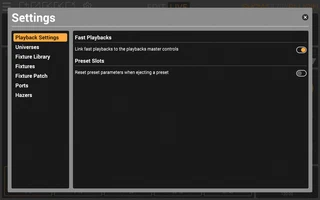
                                                                                                  Settings Panel
                                                                                                  • Main Site
                                                                                                  • Support
                                                                                                  • Downloads
                                                                                                  Follow us on Instagram
                                                                                                  Follow us on Youtube
                                                                                                  Follow us on Facebook
                                                                                                  Follow us on LinkedIn
                                                                                                  Follow us on X
                                                                                                  Follow us on TikTok
                                                                                                  Logo
                                                                                                  Copyright © 2026 Showglo Ltd. All Rights Reserved

                                                                                                  Cookies


                                                                                                  This website uses cookies to enhance user experience. Please view our Cookie Policy for more information and customisation options.

                                                                                                  Alternatively, please select one of the options below to continue.